Normals - Icosahedron
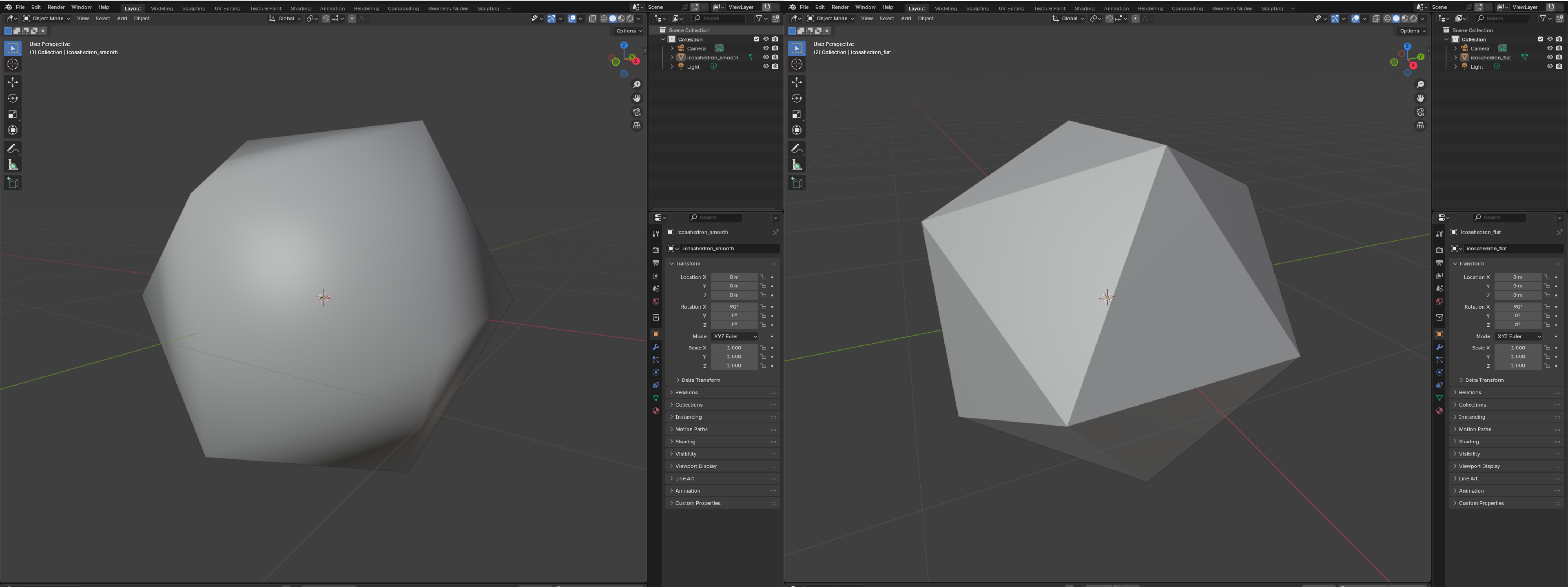
Apply the normal helper functions to the icosahedron mesh so you can export both flat (per-face) and smooth (per-vertex) versions.
Use the shared write_polygon_mesh helper from lib.rs to export OBJ files in these examples.
Example: flat vs. smooth normals
Create examples/normals_icosahedron.rs:
use truck_meshes::{
    icosahedron,
    add_face_normals,
    add_vertex_normals,
    normalize_vertex_normals,
    write_polygon_mesh,
};

fn main() {
    // Flat shading: one normal per triangle
    let mut flat = icosahedron();
    add_face_normals(&mut flat);
    write_polygon_mesh(&flat, "output/icosahedron_flat.obj");

    // Smooth shading: blended normals per vertex
    let mut smooth = icosahedron();
    add_vertex_normals(&mut smooth);
    normalize_vertex_normals(&mut smooth); // keep them unit length
    write_polygon_mesh(&smooth, "output/icosahedron_smooth.obj");
}
Run it and inspect both OBJ files in a viewer to see the difference in shading.
Direct access to the vectors
If you only need the raw vectors (instead of mutating the mesh), call:
#![allow(unused)]
fn main() {
let mesh = icosahedron();
let face_normals = compute_face_normals(&mesh);     // len() == mesh.faces().len()
let vertex_normals = compute_vertex_normals(&mesh); // len() == mesh.positions().len()
}
Use the face normals when you want a crisp, faceted icosahedron; use the vertex normals when you want a softer, smooth-shaded look.
View it
in my opinion, the contrast is clearest in Blender.
Updated directory layout
truck_meshes/
├─ Cargo.toml
├─ src/
│  ├─ lib.rs
│  ├─ shapes/
│  │  ├─ mod.rs
│  │  ├─ triangle.rs
│  │  ├─ square.rs
│  │  ├─ tetrahedron.rs
│  │  ├─ hexahedron.rs
│  │  ├─ octahedron.rs
│  │  ├─ dodecahedron.rs
│  │  └─ icosahedron.rs
│  └─ utils/
│     ├─ mod.rs
│     └─ normal_helpers.rs
├─ examples/
│  ├─ triangle.rs
│  ├─ square.rs
│  ├─ tetrahedron.rs
│  ├─ hexahedron.rs
│  ├─ octahedron.rs
│  ├─ dodecahedron.rs
│  ├─ icosahedron.rs
│  └─ normals_icosahedron.rs
└─ output/          # exported OBJ files from examples